Gazebo Simulation
Gazebo Install
Install ROS-Gazebo package.
Gazebo with ROS
- Reference : Gazebo Tutorials
Install RH-P12-RN(A) Package
Enter below command in order to download the Gazebo package for RH-P12-RN(A).
$ cd catkin_ws/src
$ git clone https://github.com/ROBOTIS-GIT/RH-P12-RN-A
Install Additional Packages
If ROS is installed with ros-kinetic-desktop-full option, additional packages are required.
$ sudo apt install ros-kinetic-ros-control
$ sudo apt install ros-kinetic-ros-controllers
$ sudo apt install ros-kinetic-gazebo-ros-control
Run Simulator
How to run Gazebo simulator.
Recommendation
Since running Gazebo from the controller PC, the realtime factor could be affected, therefore, it is recommended to run Gazebo simulation from different PC.
How to Operate
Enter below command in order to run RH-P12-RN(A) from Gazebo simulator.
$ roslaunch rh_p12_rn_a_gazebo rh_p12_rn_a_gazebo.launch
Click the Play button from Gazebo.
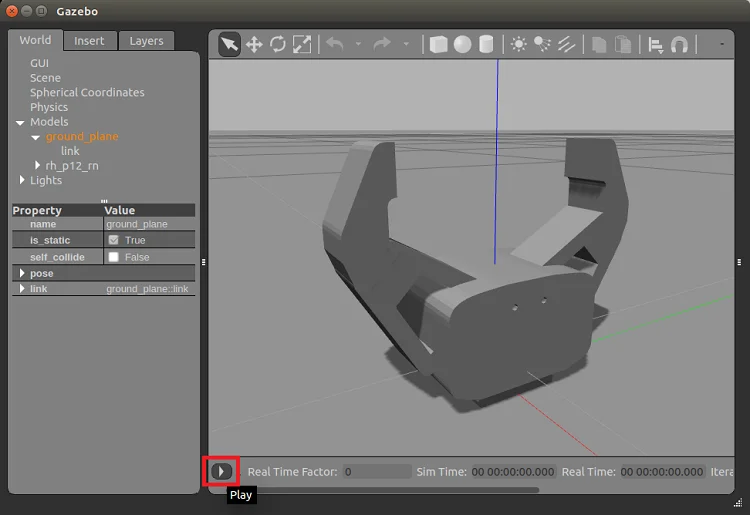
In order to control the gripper, use below commands in a new terminal window.
-
Open the grippers
$ rostopic pub -1 /rh_p12_rn_a/rh_p12_rn_a_position/command std_msgs/Float64 "data: 0.0" -
Close the grippers
$ rostopic pub -1 /rh_p12_rn_a/rh_p12_rn_a_position/command std_msgs/Float64 "data: 1.1"