Software Overview
OMY is a 6-DOF robotic manipulator designed for real-world Physical AI research.
It supports teleoperation, trajectory learning, and deployment of AI policies through a unified ROS 2 control architecture.
The platform runs on ROS 2 Jazzy and uses the ros2_control framework for real-time joint-level control.
The arm is driven by DYNAMIXEL-Y series actuators connected over RS-485 using the Dynamixel SDK.
This system is designed for:
- Collecting motion data through teleoperation
- Training and testing trajectory-based AI models
- Running learned or predefined trajectories on real hardware
OMY provides an efficient and compact platform for Physical AI research in both academic and industrial environments.
System Architecture
The diagram below illustrates the overall control structure of OMY.
Teleoperation or AI-generated commands are processed through ros2_control, translated by the hardware interface, and executed by DYNAMIXEL actuators via RS‑485.
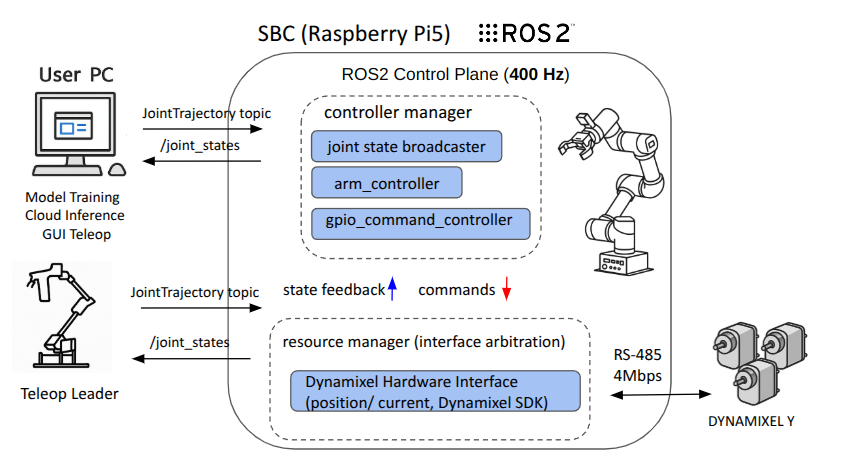
| Layer | Component | Description |
|---|---|---|
| Compute | Raspberry Pi5 | ROS 2 Jazzy |
| Motion Control | ros2_control | Real-time joint control at 400Hz |
| Actuators | DYNAMIXEL-Y series | High-torque servo via RS-485 |
| Communication | RS‑485 | Dynamixel Protocol 2.0 |
| Networking | Ethernet | Remote access |
| Sensors (optional) | Intel RealSense D405 | Mounted on wrist (F3M only) |
Why ros2_control?
OMY uses ros2_control for modular, real-time control of its joints.
- Clean separation between hardware and control logic
- Supports multiple controller types (trajectory, GPIO, command)
- Integrates easily with teleop, GUI, and AI-based trajectory sources
This makes it easy to switch between manual, scripted, or learned motion strategies.
Motion Execution Pipeline
Input Source (Teleoperation / AI Policy)
      ↓
ROS 2 JointTrajectory / Command Topics
      ↓
controller_manager (400Hz loop)
      ↓
OMY Controllers
      ↓
DynamixelHardwareInterface
      ↓
RS‑485 Bus
      ↓
DYNAMIXEL-Y Actuators
Controller Configuration & Joint Mapping
| Controller | Segment | DOF | Input Topic |
|---|---|---|---|
arm_controller | 6-DOF Arm | 6(7) | /leader/arm_controller/joint_trajectory |
gpio_command_controller | Gripper (GPIO pin) | 1 | /gpio_command_controller/commands |
joint_command_broadcaster | All joints (read-only) | – | Publishes to /joint_states |
In AI TELEOPERATION mode, the number of joints in the Arm Controller becomes 7.
- All actuators operate in position mode by default.
Controller YAML Example (link)
/**:
  controller_manager:
    ros__parameters:
      use_sim_time: False
      update_rate: 400  # Hz
      thread_priority: 40
      cpu_affinity: [1, 2, 3]

      joint_state_broadcaster:
        type: joint_state_broadcaster/JointStateBroadcaster

      arm_controller:
        type: joint_trajectory_controller/JointTrajectoryController

      gpio_command_controller:
        type: gpio_controllers/GpioCommandController

/**:
  arm_controller:
    ros__parameters:
      joints:
        - joint1
        - joint2
        - joint3
        - joint4
        - joint5
        - joint6
        - rh_r1_joint

      interface_name: position

      command_interfaces:
        - position

      state_interfaces:
        - position
        - velocity

      allow_partial_joints_goal: true

/**:
  gpio_command_controller:
    ros__parameters:
      type: gpio_controllers/GpioCommandController
      gpios:
        - omy_end
      command_interfaces:
        omy_end:
          - interfaces:
            - R LED
            - G LED
            - B LED
      state_interfaces:
        omy_end:
          - interfaces:
            - Button Status
Debugging & Visualization Tools
| Tool / Topic | Description |
|---|---|
ros2 control list_controllers | Check controller status |
ros2 topic echo /joint_states | Monitor joint position/velocity |
| Rviz2 | 3D view of robot model (URDF), TF, and movement |
Safety & Limits
- Joint limits are defined in the URDF and enforced at the controller layer
- Velocity/position clamping can be configured per joint
- Communication errors are detected by the Dynamixel hardware interface